PETSUMADIGITAL PRODUCTS
PETSUMA STOCK & SALES

Run your shop
with clarity.

Sell quickly, control stock, manage expenses, close every day and understand the business—from the WebApp or Android.

Built for real shop conditions. Practical workflows, controlled access and dependable records.

app.petsumadigital.comConnected
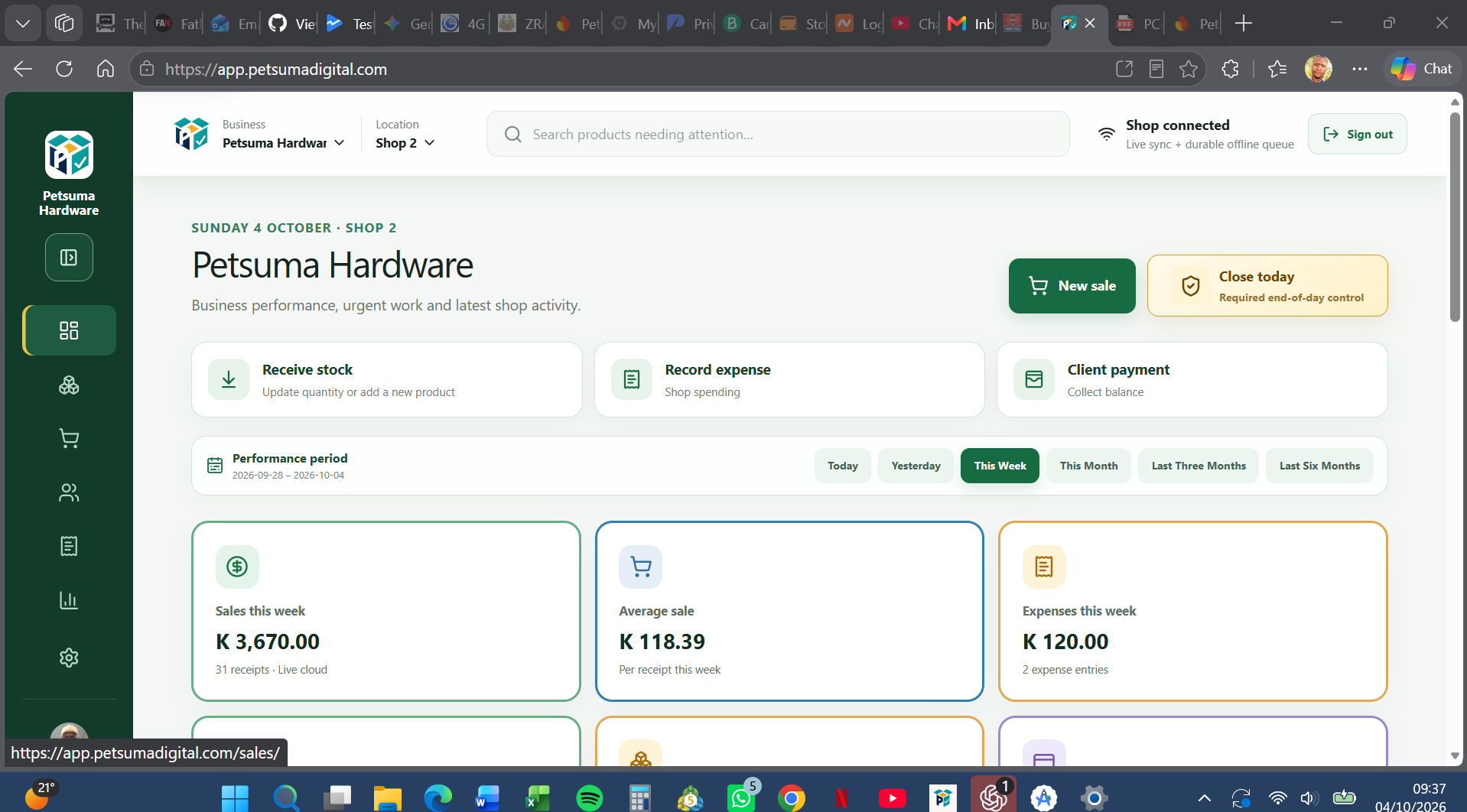
PETSUMA WebApp business overview
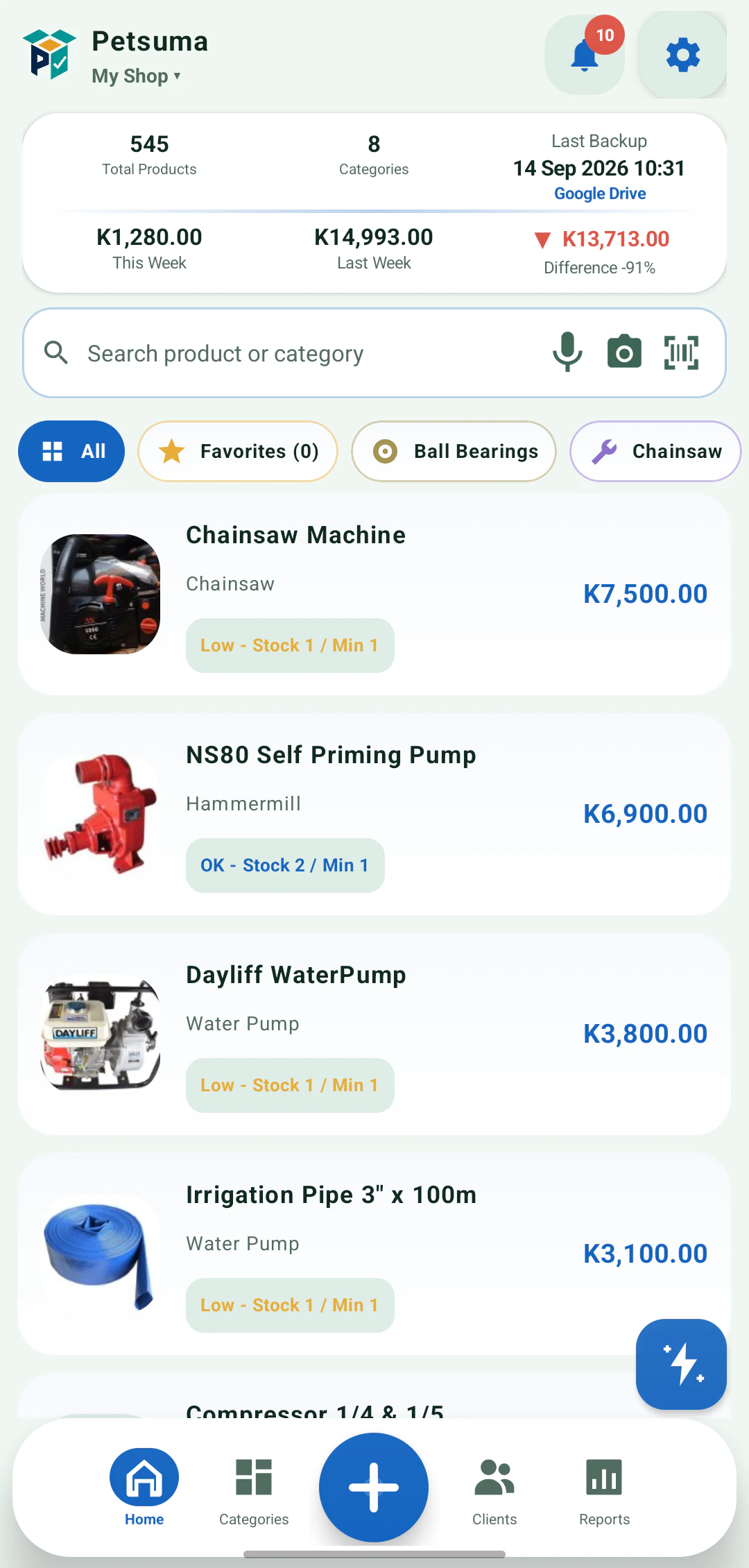
PETSUMA Android business home
●
ONE CONNECTED SYSTEMWebApp + Android
Focused cashier•Offline-ready Android•Multi-location control•Decision-ready reports•Direct support
MORE THAN A CHECKOUT SCREEN

One operating picture
for the whole shop.

PETSUMA joins the work that usually becomes scattered across notebooks, spreadsheets, phones and memory. Every part of the day feeds one clearer view of the business.

SalesWhat was sold and how it was paid
StockWhat moved, what is low and what is idle
ControlWho acted, what changed and how the day closed
THE DAILY OPERATING RHYTHM

From stock arriving
to the final cash count.

Each stage carries its information forward, giving the owner and team one dependable operational story.

01

Receive

Bring products into stock with quantities, costs, references and a clear movement history.

02

Sell

Search or scan products, serve customers quickly and keep quantities accurate as sales happen.

03

Control

Record expenses, petty cash and customer balances without losing the audit trail behind each entry.

04

Close

Count the drawer, retain the next opening float, record deposits and explain differences before the day is closed.

05

Decide

Compare periods, understand discounts and stock-in activity, and find slow or dead stock before it ties up more cash.

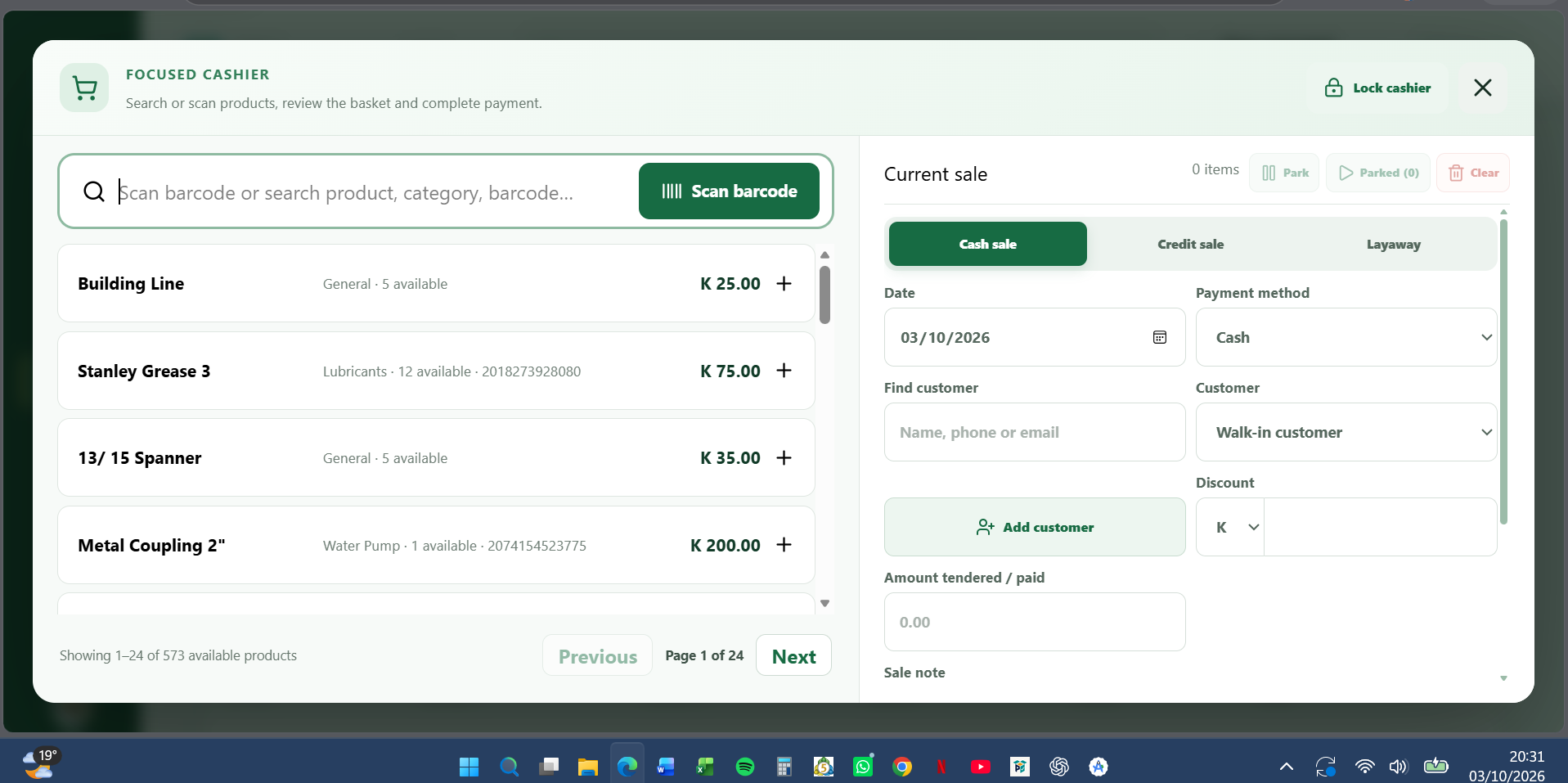
PETSUMA focused cashier WebApp screen
Focused cashier · full-screen shop operation
BUILT FOR THE BUSY COUNTER

Fast when it needs to be.
Controlled where it matters.

Search or scan, build the basket, choose the sale type and complete payment without leaving the focused workspace.

  • Repeated barcode scans increase basket quantity
  • Clear out-of-stock feedback prevents silent failures
  • Lockable full-screen cashier keeps the team focused
  • Cash, credit and layaway remain distinct
Explore Stock & Sales
CONNECTED CAPABILITIES

Everything important.
Nothing isolated.

Daily shop functions share the same business, location and access context so teams can move quickly without weakening control.

01

Cashier and sales

Barcode-ready selling, multiple scans, discounts, parked baskets, cash, credit and layaway workflows.

02

Inventory control

Products, categories, stock receiving, adjustments, movements, low stock, out-of-stock and dead-stock attention.

03

Clients and receivables

Customer profiles, balances, quotations, invoices, payments and clear account histories.

04

Expenses and petty cash

Structured expense capture, receipt evidence, payment sources, petty-cash activity and review controls.

05

Daily closing

Opening float, cash sales, paid-outs, drawer expectation, retained float, secured deposit and recorded variance.

06

Reports and exports

Sales, discounts, stock-in, inventory ageing, movement, category and operational reports for better decisions.

07

People and access

Staff roles, permissions, working locations, invitations and controlled actions for sensitive work.

08

Businesses and locations

Keep businesses and their locations separate, then switch context without mixing operational records.

REPORTS THAT LEAD TO ACTION

See what happened.
Know what to do next.

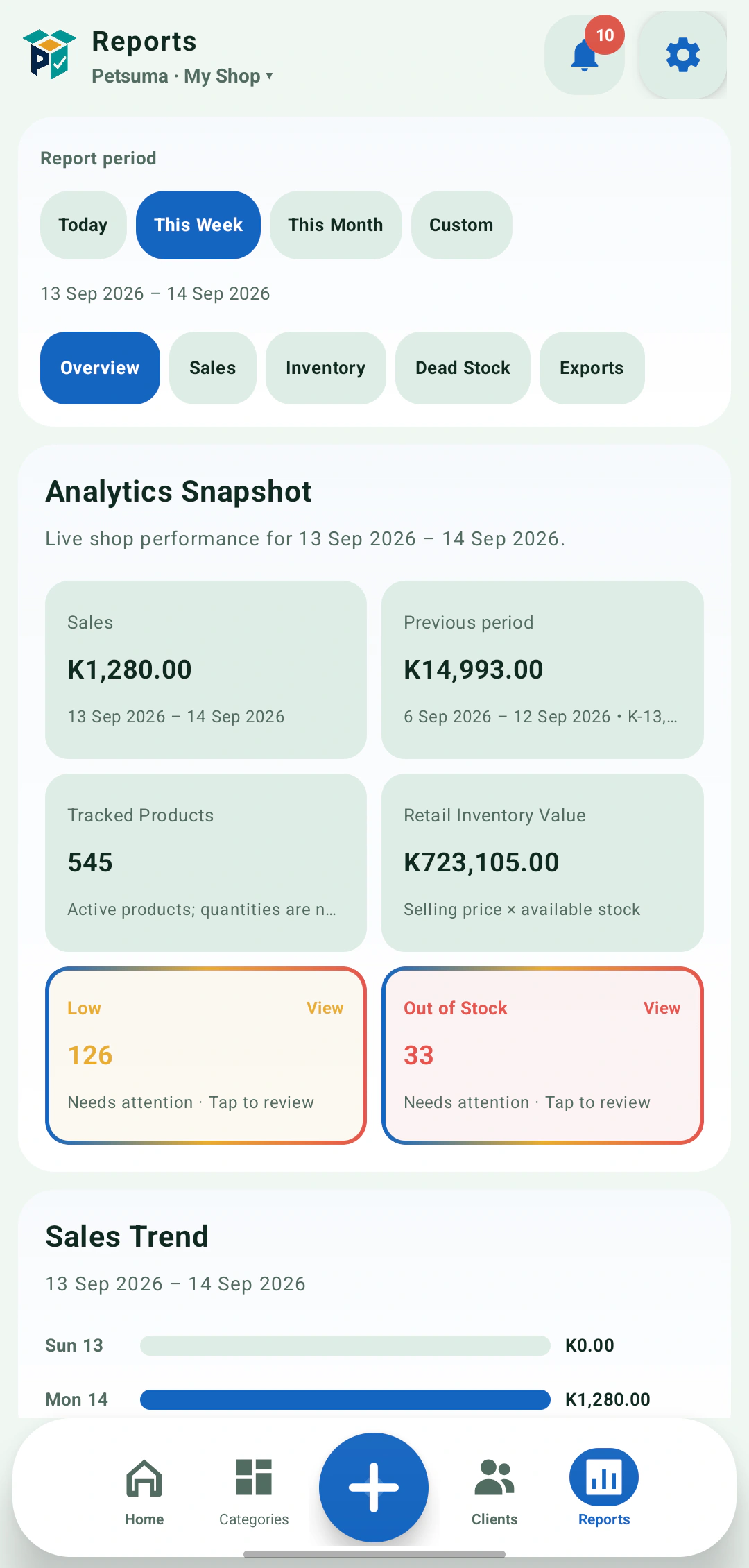
Move beyond totals. PETSUMA connects sales, payments, discounts, stock movements, expenses and closing records so reports can answer practical questions.

What should we reorder?Which stock is not moving?How much discount was given?Did the drawer close correctly?
PETSUMA reports and analytics on AndroidSales · inventory · dead stock · controls

See PETSUMA
in motion.

A genuine Android walkthrough—not a simulated interface. Move from the live shop dashboard into organised categories, business reports, stock tools and fast selling.

  1. HomeReview weekly sales, products, categories and recent activity.
  2. ReportsCompare periods and inspect sales performance and top movers.
  3. StockOpen the stock workspace and move directly into fast selling.
Recorded directly from the real Android app
ONE SYSTEM · EVERY WORKING POSITION

Management on the web.
Shop-floor work on Android.

Use each interface where it is strongest while the selected business and location keep the work correctly organised.

WEBAPP

A wider operational view

Ideal for overview, setup, focused cashier use, expenses, closing, clients, staff controls and deeper reporting.

Open WebApp ↗
ANDROID

Work wherever the stock is

Ideal for receiving, scanning, selling, counting, product photos and daily actions around the shop.

Ask about Android access ↗
CONTROL WITHOUT THE CLUTTER

Access, evidence and continuity
built into the work.

Roles and locations shape what people can reach. Expense evidence, movement histories and daily closing preserve context. Offline queues and synchronization foundations help the shop continue through unreliable connectivity.

STRAIGHTFORWARD PLANS

Start with the essentials.
Grow without rebuilding.

Begin with a small catalogue, then expand into connected devices, richer reporting and stronger operational controls.

FREE

US$0 · forever

For a small shop getting organised.

  • Up to 50 active products
  • Core sales and stock tools
  • Barcode support
  • Basic reports
  • Offline Android use
Open WebApp

Plan availability and included capabilities are shown during account setup. Contact PETSUMA if you need help choosing the right configuration.

START WITHOUT THE CHAOS

Three practical steps
to a clearer shop.

  1. 1
    Create your account

    Open the WebApp and set up the business.

  2. 2
    Add a location and products

    Start manually or bring an existing catalogue.

  3. 3
    Connect the team

    Assign access and begin daily shop work.

Open PETSUMA
PRACTICAL ANSWERS

Before you bring PETSUMA into the shop.

Need an answer specific to your operation? Speak directly with the PETSUMA team.

Ask on WhatsApp ↗
Can PETSUMA keep working when the internet is unreliable?+

Yes. Core Android workflows are designed to keep local records available and queue eligible changes until connectivity returns. The WebApp gives managers a connected operational view.

Can we use PETSUMA from more than one device?+

PETSUMA supports connected work across the WebApp and authorised Android devices. Access is controlled by the selected business, location and staff permissions.

Does it work with barcode scanners?+

The focused cashier is designed for barcode-led selling, including repeated scans that add quantity to the current basket.

Can I manage more than one business or shop location?+

Yes. PETSUMA separates businesses and their locations so products, staff access and records remain in the correct operational context.

What can I see in reports?+

Reports cover sales performance, payment methods, discounts, products, categories, stock-in, movements, stock ageing, dead stock and other operational controls.

How do I get help setting it up?+

PETSUMA provides direct email and WhatsApp support for onboarding, product imports and workflow questions.

PETSUMA DIGITAL PRODUCTS

Manage today.
Grow tomorrow.

Open the WebApp or talk to us about setting up PETSUMA for your business.

WhatsApp PETSUMASupport & consultation